Open Dhru Chat → Settings → Channels → All channels in the correct workspace. You need permission to view channel settings and management permission to connect accounts or save changes. Start with website Messenger, then connect the other places your customers use.
Choose a channel
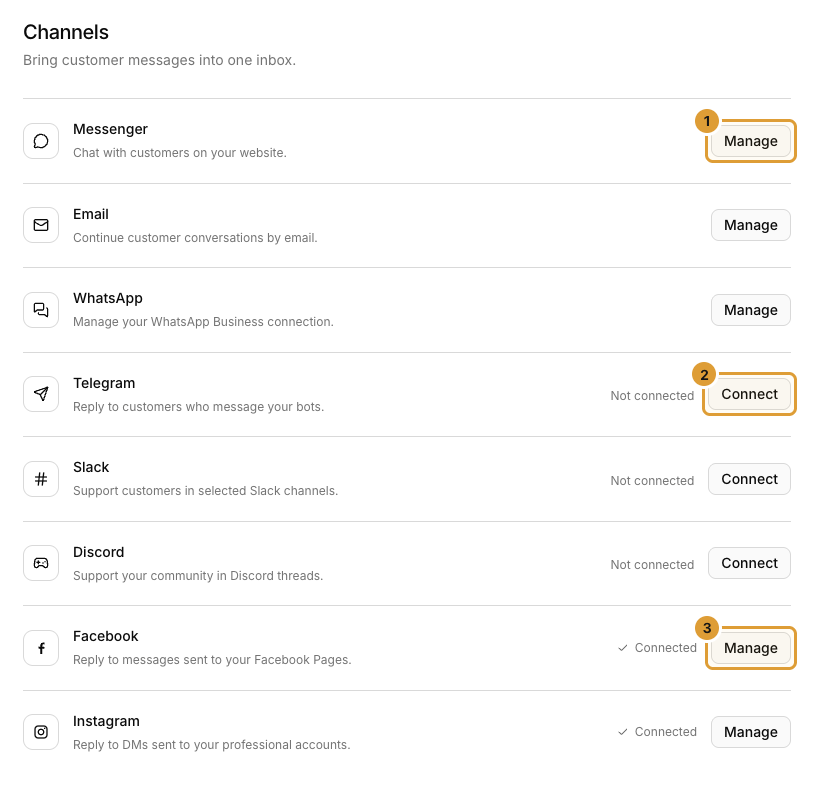
| Channel | What it connects |
|---|---|
| Messenger | Website chat, search, AI handling and human handoff |
| Unread staff-reply emails and replies back into the conversation | |
| Your business-owned WhatsApp number | |
| Telegram | A dedicated support bot |
| Slack | One selected support channel per workspace connection |
| Discord | One selected support channel per server connection |
| Messages to a Page, where available | |
| DMs to a professional account, where available |
Connect and verify
- Select Manage or Connect beside the intended channel.
- Follow that channel’s guide below. Website approval, bot tokens and provider authorization use different steps.
- Check the saved connection status and intended account or destination.
- Send a test from an account you control and check it in Inbox.
- Reply from Inbox and confirm receipt at the original channel.
- Configure AI separately where offered. A successful connection alone does not enable AI answers.
Availability and connection limits
Follow the allowance shown beside your channel and use Compare plans when offered. A disabled Add button may mean the allowance is reached, your role cannot edit, or setup is unavailable. Coming soon means this channel cannot be configured in your workspace yet.
Website setup
Start with Messenger Install on another website Customize design and greetings Set launcher position and offsets Choose AI and live-chat features
Other channels
Conversation email settings WhatsApp Telegram Slack Discord Facebook Instagram
Where messages appear
Use Inbox to review incoming conversations and their channel. These connections are separate from system order/invoice notifications and from contacting DHRU about your own subscription. Learn how to use the Inbox.