Open Dhru Chat → Settings → Channels → Messenger → Widget, then expand Launcher. The launcher is the button visitors use to open or close website chat.
Set the corner and gaps
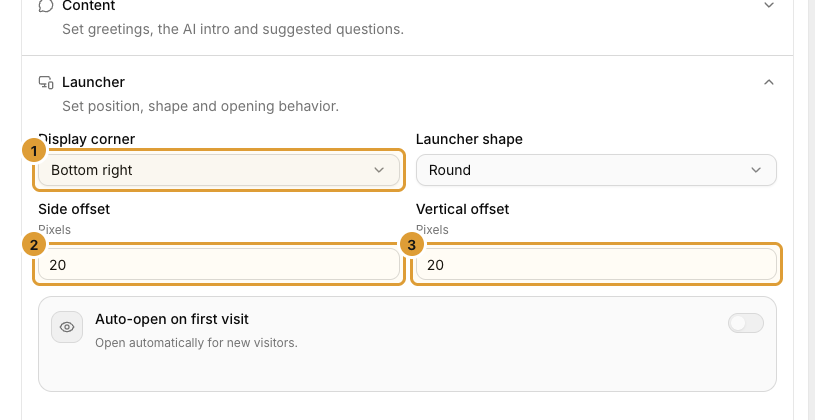
- Choose Display corner (1). It determines the horizontal side and the top or bottom edge used for placement.
- Choose Launcher shape.
- Enter Side offset (2): the gap, in pixels, from the selected left or right edge.
- Enter Vertical offset (3): the gap, in pixels, from the selected top or bottom edge.
- Use values from 8 to 80 pixels in each offset field.
- Select Save changes, wait for confirmation and check your actual website.
For example, Bottom right, Side offset 20, and Vertical offset 20 places the launcher near the bottom-right corner with a 20-pixel gap from each selected edge. These are gaps, not the launcher’s width or height.
Choose whether it opens automatically
Auto-open on first visit opens the widget automatically for new visitors when enabled. Leave it off if visitors should open chat themselves. Check the first-visit experience in a separate authorized test browser context; an existing visitor can behave differently.
Check your mobile website
Check the closed launcher and open chat panel on a narrow phone screen and desktop. Leave room for cookie notices, bottom navigation, checkout actions and other floating buttons. Revisit the gaps when your website layout changes.
If chat is absent entirely, check the saved channel switch and website approval and installation.